
Prices
List prices, tiered pricing and validity-based prices.
Price logic
In TradelinePro you can model customer-specific prices. For this, TradelinePro provides the following levels of price maintenance. In this way, even complex situations can be modelled.
- Global (for everyone)
- Customer groups
- Organisations
TIP
Product prices are also covered in the chapter "Individual terms". Please consider the following chapter together with the individual terms in an overall context.
Price fields
The following table describes these data fields and also indicates whether they are entered or calculated automatically.
| The maintenance mask in shop administration allows prices to be entered both gross and net. We strongly advise maintaining prices net in B2B scenarios (see here) and gross in B2C scenarios. | ||
| Currency-dependent prices | ||
| Decimal places: | ||
| Selling price | By selling price we mean the price the customer has to pay. It is derived from one of the following:
| calculated |
| Promotional price | The system provides different ways to apply a promotional price:
| |
| Minimum price | (smallest customer-dependent unit price, also taking a price tier into account) | calculated |
| List price | The list price refers to the basic price in the shop system. | data entry |
| Tier price | List prices can be set as a quantity discount depending on the order quantity. | data entry |
| Group price | Product prices can be stored depending on the customer groups. An organisation (user) is assigned to a specific customer group and receives the prices of that customer group. Group prices can also be maintained as tier prices. By default, the group price overrides the list price. | data entry |
| Individual prices | Prices can be stored individually for specific customers (organisations). Individual prices can also be set as a quantity discount depending on the order quantity. Details on maintenance and behaviour can be found in the chapter Customer-specific prices. | data entry |
| Strikethrough price | The strikethrough price refers to the special price. By entering this price, you achieve
| data entry |
| RRP | …. | |
| Purchase price | The purchase price is optional and is not displayed in the storefront. It often serves as a calculation basis for marketing campaigns or marketing automation, e.g. in performance marketing. The field accepts any numeric value and can therefore be interpreted freely. | data entry |
| Further price fields Additional price fields can be inserted at any time and used for adapted processes. This work must be carried out by the implementation team. |
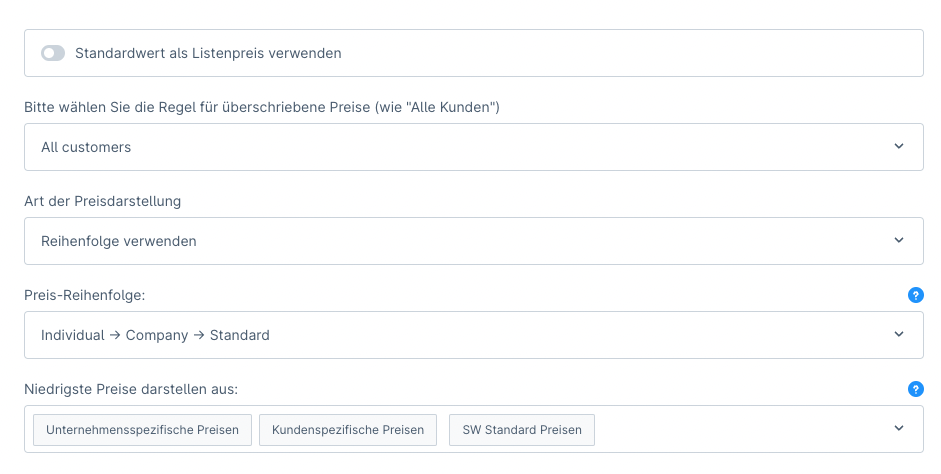
You can configure whether terms that override the list price (group prices, individual prices) are visually marked or whether they simply replace the list price neutrally.
You can also configure the order in which price models are applied, or whether the lowest price is applied, or a price defined by order which may also be higher than the list price. Please refer to the chapter "Individual prices" for further details.
VAT / net prices
TradelinePro is to be configured for productive use in such a way that a typical B2B configuration or display of VAT is achieved.
TIP
The settings are illustrated for the following scenario: an organisation based in Germany delivers from a warehouse in Germany. The destination countries are domestic, in the intra-community EU and in third countries.
Currency-dependent prices
Customs duties
Configuration
The configuration is done via Settings → Taxes. Details can in principle be found in this documentation.
The tax rules and tax rates per country are preconfigured with the setup of the system. Via the area Settings → Countries, you now define for which countries the tax-free delivery applies.