
Individual product numbers / order numbers
Order numbers, supplier numbers and customer-specific codes.
In TradelinePro, it is possible for company customers to store their own specific order numbers (product numbers) as additional information.
The relationship is always established here via the original product number of the shop. Individual product numbers are always linked to the company account, and are only visible and usable within it.
The order numbers are displayed in addition to each product number. The label reads "Own order no.".
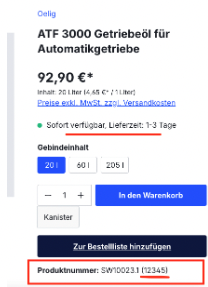
The order number is also passed through to the orders and can thus be transferred to the ERP.
The ability to manage individual order numbers (edit, delete, add, upload) can be restricted to "read-only" for certain users in the company's role and permissions management.
The order numbers can be stored in the customer account. Two options are available to you for this. Smaller changes can be made easily via manual entry. For extensive data maintenance, a file upload is available.
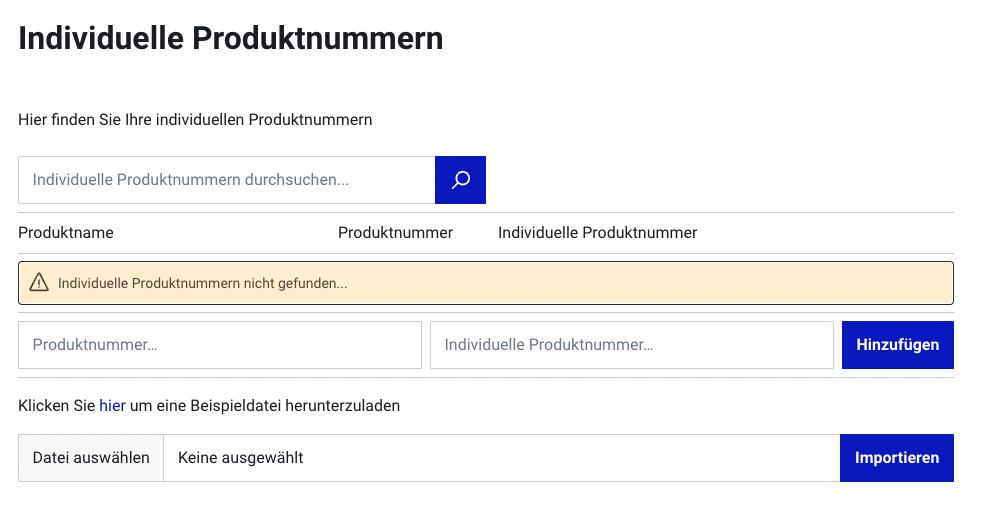
For example, create a file with 2 columns in Excel and save it as a so-called CSV file in text format. The field names are
- productNumber: Enter the product number of the shop in this column
- customProductNumbers: Enter your own order number in this column
The separator must be the semicolon ";".
The user can download a template that can then simply be filled in. To do this, they click on the "Download order file" link