
Documents portal
Order confirmations, delivery notes and invoices in the customer portal.
Via the invoice or documents portal, you can provide any documents from your ERP to your customers.
It is also possible to provide documents that represent processes from other channels. The feature is therefore not limited to orders placed in the shop.
Via the orderNumber field you can pass a reference number. If this reference number matches an order number in the shop (and the calling user has the right to see it), the document is automatically linked to the order in the shop.
Display of documents in the account
The documents are stored in the customer account grouped into tabs.
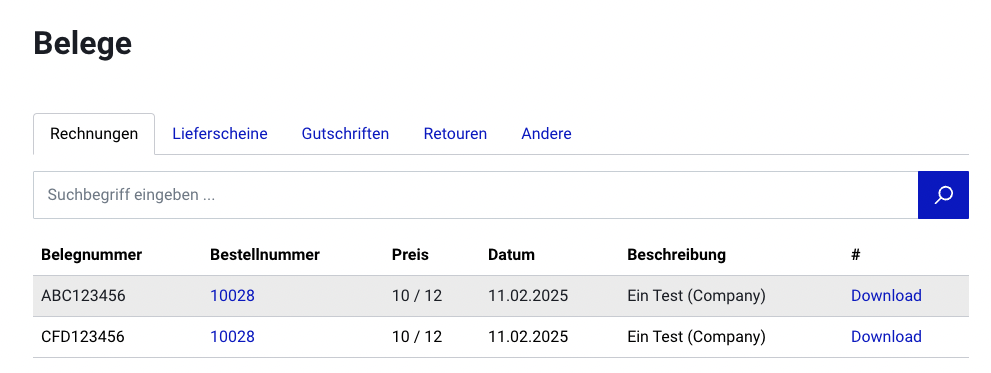
Adding new documents
Documents can only be added via the web service.
The following values can be set in the document upload request. They are resolved and displayed accordingly.
- customerNumber = customer number
- customerGroupName = name of the customer group
- companyGroupName = name of the organisation
You can also pass the customer, group & organisation directly by ID:
- customerId
- customerGroupId
- companyGroupId
You do not have to pass the "fileName" in the query. That is optional; otherwise the file name from the uploaded file is used. I only have this here so that I can always upload the same file. An error is thrown if a file already exists!
For example, this is what a request that resolves and assigns the organisation looks like:
curl --location 'https://YOUR_STORE_URL/api/_action/receipt/upload?fileName=Test91112532&XDEBUG_SESSION_START=XDEBUG_ECLIPSE' \
--header 'Authorization: Bearer XXX' \
--form 'file=@"/home/ts/Downloads/Test_PDF.pdf"' \
--form 'active="true"' \
--form 'companyGroupName="digitalmanufaktur GmbH"' \
--form 'type="1"' \
--form 'number="CFD123456"' \
--form 'receiptDate="11.02.2025 15:00"' \
--form 'orderNumber="10028"' \
--form 'netAmount="10"' \
--form 'grossAmount="12"' \
--form 'description="Ein Test (Company)"'
Document types:
- 1 = Invoice
- 2 = Delivery note
- 3 = Credit note
- 4 = Returns
- 99 = Other