Customer-specific prices and terms
Modelling customer-specific prices, tiered prices and promotions.
The system offers you the following options for differentiating prices for your customers:
- Price lists are stored at customer group level
- Price lists are stored at customer (company) level
- Prices are calculated live in the cart by the ERP (for the entire cart) — for details on how this works and how it is configured, please refer to the following chapters.
INFO
Looked at more broadly, further surcharges and discounts are possible at the "header level" of the order. How this works is described here
Depending on which price-finding model is suitable for your digital sales channel, a practical approach must be defined for the price display in the shop.
In principle, you should be guided here by the principle that the ERP is the leading system, i.e. your customer receives a consistent offer across all touchpoints with your company. All prices that the customer sees in the shop must therefore be identical to the prices in the ERP for that debtor. If a specific price list exists for the customer, this must of course also be congruent.
Pricing models
The following pricing models can be provided in TradelinePro.
The pricing models can generally be combined in operation. For example, a standard price can be set in principle for all customers, which is then overridden by specific prices for certain customer-product combinations.
The system assumes that you store a specific price per product or per product-customer combination in the system. Discount tiers for regular customers or similar are not provided for (note: discounts can be configured for the purpose of marketing campaigns via a comprehensive ruleset, see here).
Standard price list (generally applicable price)
All customers receive the same price, or a product-related price tier.
To use this function, all prices must now be pre-calculated and transferred from your ERP to the shop system. Please read the interface description for this.
Prices per customer group
The price by customer group is suitable for scenarios in which a standardised pricing policy is pursued without individual agreements. Although the system theoretically has no limit on the number of customer groups and prices, the implementation team should be consulted from 20 customer groups onwards in order to ensure a stable system.
Customers are categorised into customer groups. Within this customer group, all customers receive the same price, or a product-related price tier.
To maintain prices per customer group, customer groups must have been created and configured beforehand. You can find out how this works here.
You maintain price tiers themselves per product. Open the desired product and switch to the "Advanced prices" tab. There you can now create any number of prices/price tiers according to rules. Once you have selected a rule, you can now maintain the prices per quantity (from/to):
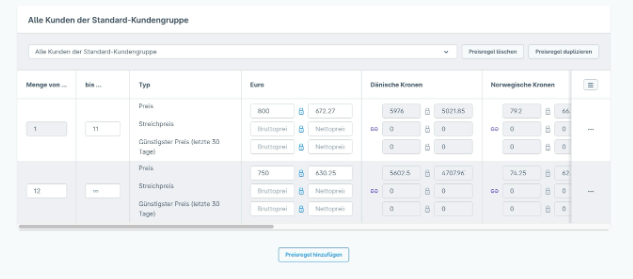
To use this function, all prices must now be pre-calculated and transferred from your ERP to the shop system.
Customer-specific price
As soon as individual prices negotiated for the specific customer apply to your customer relationships, this can be solved via the individual prices function.
Specific prices can then be stored for the combination of company and product. It is also possible to store tiered prices here. For example, to grant volume discounts for certain order quantities.