
Quick Order
Add multiple items to the cart by item number or name.
The "Quick Order" feature gives users two additional, fast ordering paths:
- Quick search by product and item number with the option to add the product directly to the cart
- Import of product lists in CSV or XLSX format
Search
The quick order search in the storefront is located in the customer account under the "Quick Order Search" entry, as well as via a rocket icon in the header. There you will find an input field where you can search for products. Search terms that can be used here are product name, product number and EAN. As soon as you enter a search term, the search starts automatically:
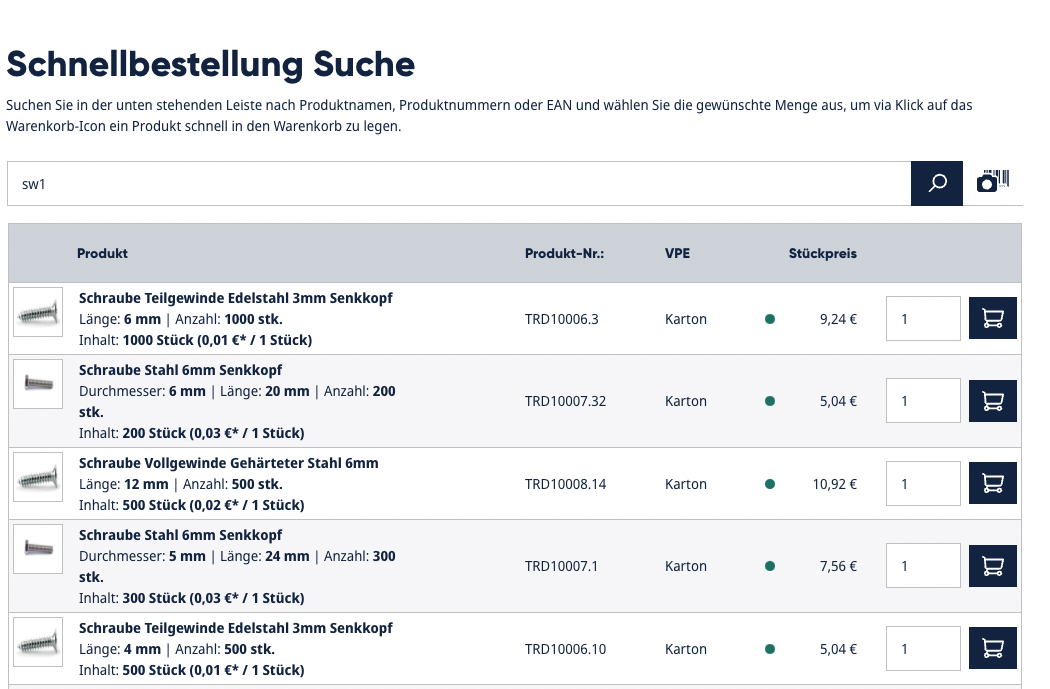
The results are displayed in a very compact way and allow direct selection of the quantity. You can add the desired products to the cart immediately.
Cart Import
The cart import is located in the customer account under the "Cart Import" entry. Here you can upload a CSV or XLSX file, which can then be imported. The shop processes the product requests from the file and adds them to the cart in the specified quantity.
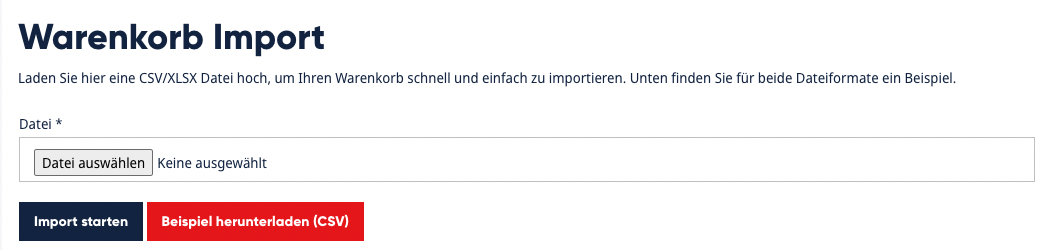
The import detects errors in the files automatically and can provide corresponding guidance. For example, empty lines or lines with unknown products are flagged. All other correct lines are still imported and the products are placed in the cart.
You will also find the sample files here that you have stored in the plugin configuration. Users can download these and use them as a template for their own file. They only need to enter the desired products with the corresponding quantities.
Cart Export
To prepare an import file for the cart, you have the option of exporting the current cart as a file:
- The current cart is then saved in the correct format in a CSV file, which can be imported again in the customer account via the importer.
Configuration
The configuration of the module takes place in this area:
| Active | This setting lets you activate or deactivate the plugin in the storefront. If this setting is not active, the plugin's features are not visible. |
| Hide product images in quick order | This setting lets you configure whether product images are visible in the result list of the quick order search or not. If you activate this setting, the matching products are displayed without an image. |
| Sample file CSV | Here you can store a sample file for the cart import in CSV format. This file is available to the customer in the storefront for download, so they can create their own import file in the correct format. |
| Sample file Excel | Here you can store a sample file for the cart import in XLSX format. This file is available to the customer in the storefront for download, so they can create their own import file in the correct format. |